

Tag Archives: UV Led Printer Machine
Desktop UV Printer: Complete buyer’s guide for small businesses

A Desktop UV Printer is becoming one of the most practical investments for startups and growing businesses that want to enter the custom printing industry. From personalized gifts and promotional merchandise, to retail branding and interior décor products, the demand for high-quality, short-run printing continues to increase across multiple industries.
In contrast to traditional printing techniques, UV printing uses specially formulated inks that are instantly set with ultraviolet light, eliminating lengthy drying times. This process creates vibrant, scratch-resistant graphics directly on rigid materials such as acrylic, wood, leather, metal, plastic, and compatible glass surfaces. Since the prints are ready immediately after production, businesses can reduce turnaround time and handle more customer orders without additional drying processes.
For entrepreneurs looking to start with a manageable investment, a compact UV printing system offers professional-quality output while requiring far less space than industrial equipment.
What makes Desktop UV Printer printing technology suitable for small businesses?
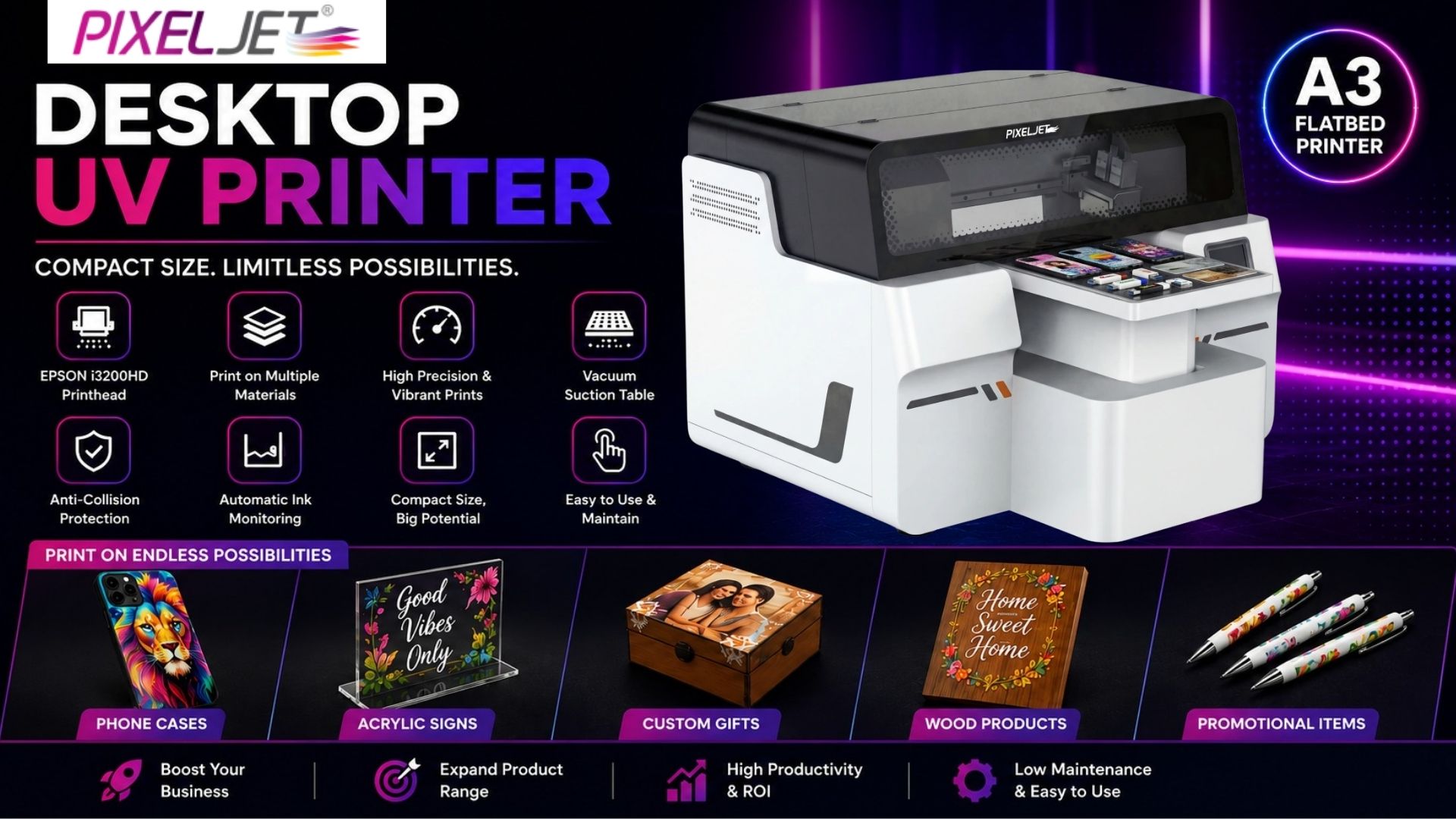
One of the biggest advantages of desktop UV printing is its flexibility. Rather than investing in multiple machines for different applications, businesses can use a single system to produce various customized products for different customer segments. For businesses looking for a compact and versatile printing solution, the Pixeljet® Desktop A3 UV Flatbed Printer can be considered for a wide range of customized printing applications.
Most modern systems use UV Led Printer Machine technology, which instantly dries the ink using ultraviolet light while generating minimal heat. This allows businesses to print on a wider range of heat-sensitive materials while maintaining consistent print quality. Lower energy consumption also helps reduce operating costs over time.
Another reason these machines are popular is their compact yet capable design. An A3 flatbed printing area is large enough for products such as mobile covers, acrylic signs, promotional gifts, leather accessories, wooden décor items, and customized corporate products. Many models also support rigid materials up to 100 mm thick, allowing businesses to expand into more premium applications as customer demand grows.
Because the technology is based on modern digital printing technology, businesses benefit from precise image reproduction, vibrant colours, and faster production compared to many conventional printing methods.
Popular applications across different industries
A desktop UV printing solution allows businesses to serve multiple markets without significantly increasing production costs.
Common applications include:
- Mobile phone covers
- Acrylic nameplates
- Promotional gifts
- Leather accessories
- Wooden decorative products
- Metal plaques
- Packaging prototypes
- Small signage
Its ability to print on different rigid materials makes it suitable for promotional product manufacturers, advertising agencies, print-on-demand businesses, gift shops, home décor companies, and small signage manufacturers.
Businesses planning to increase production capacity often compare these machines with UV Flatbed Printers before investing in larger equipment.
Who should invest in a Desktop UV Printer?
A desktop UV printing system is particularly suitable for entrepreneurs who want to start a customization business without investing in large industrial machinery.
It is commonly chosen by:
- Startup printing businesses
- Promotional product manufacturers
- Corporate gifting companies
- Mobile accessory manufacturers
- Interior décor studios
- Advertising agencies
- Retail branding businesses
- Print-on-demand service providers
Before making an investment, it is also useful to evaluate the UV Printing Machine for Startup Cost to understand how machine size, production capacity, and future business expansion affect the overall budget.
Key factors to evaluate before buying
Selecting the right machine requires more than comparing prices. Long-term productivity depends on print quality, ease of operation, maintenance requirements, and production efficiency.
Choose the Right Print Area: Select a print size that matches your product range. An A3 flatbed configuration is ideal for most customized products while remaining compact for small workspaces.
Check Printhead Performance: Print quality depends largely on the printhead. Machines equipped with EPSON i3200HD technology deliver sharp text, smooth gradients, and vibrant CMYK, white, and varnish printing for professional-quality results.
Look for Automatic Media Height Detection: This feature automatically adjusts the printhead based on the thickness of the material, reducing setup time and ensuring accurate printing on different substrates.
Ensure Stable Media Handling: A vacuum suction table securely holds rigid materials in place during printing, helping improve print accuracy and consistency.
Prioritize Safety Features: Anti-collision protection helps prevent accidental damage to the printhead, reducing maintenance costs and machine downtime.
Monitor Ink Levels Efficiently: An automatic ink monitoring system alerts operators before ink runs low, minimizing production interruptions and ensuring continuous workflow.
Desktop UV Printer vs Industrial UV Printing Systems
Choosing the right machine depends on your production goals, available workspace, and daily order volume. While desktop models are ideal for customized products and short production runs, industrial systems are better suited for large-scale manufacturing.
| Feature | Desktop UV Printer | Industrial UV Printer |
| Workspace | Compact | Large Production Area |
| Initial Investment | Lower | Higher |
| Daily Production | Low to Medium | High Volume |
| Best For | Small Businesses & Startups | Large Manufacturers |
| Product Size | Small to Medium Products | Large Rigid Sheets |
| Custom Orders | Excellent | Good |
For most startups, a desktop model provides the right balance between affordability, versatility, and production efficiency. As order volumes grow, businesses can later upgrade to a UV Flatbed printing machine for larger applications and higher throughput.
Investment cost of a Desktop UV Printer
The purchase price is only one part of the investment. The overall value of a printing system depends on its production capacity, print quality, automation, warranty, and long-term operating costs.
| Desktop UV Printer Type | Best For | Approx. Price (India) |
| Entry-Level Desktop UV Printer | Startups & Hobby Businesses | ₹2.5 – ₹4.5 Lakhs |
| Mid-Range UV Led Printer Machine | Small Printing Businesses | ₹4.5 – ₹7 Lakhs |
| Professional Desktop UV Printer | High-Volume Custom Printing | ₹7 – ₹12 Lakhs |
Note: Prices are approximate and may vary depending on print size, printhead configuration, software, automation features, warranty, installation, and after-sales support.
Beyond the machine price, businesses should also consider ink consumption, maintenance, workspace setup, operator training, and technical support. Working with experienced UV Printer Manufacturers in India can simplify installation, improve operator training, and ensure faster access to spare parts and support when required.
Before investing, it’s also useful to explore developments in advanced printing solutions to understand how automation, printhead technology, and production workflows continue to evolve.
Simple ways to extend your printer’s lifespan
- Clean the printhead regularly to maintain consistent print quality and prevent clogging.
- Perform daily nozzle checks to detect and resolve printing issues before they affect production.
- Use recommended UV inks to ensure reliable performance and long-lasting prints.
- Keep the workspace clean and dust-free to protect sensitive printer components.
- Choose machines with automatic ink monitoring and printhead protection to reduce downtime and prevent unexpected interruptions.
- Follow the manufacturer’s maintenance schedule to extend the printer’s lifespan and lower long-term operating costs.
Is buying a Desktop UV Printer a smart business decision?
A compact UV printing system enables short-run production without expensive tooling, making it easier to fulfil personalized orders while maintaining healthy profit margins. Because one machine can produce products for multiple industries. Return on investment depends on production volume, product pricing, maintenance practices, and customer demand rather than the purchase price alone.
When comparing options, look beyond technical specifications. Choosing the right UV Printer for Small Business with reliable performance, easy maintenance, and dependable after-sales support can significantly improve long-term productivity and help maximize your return on investment.
Common buying mistakes first-time buyers should avoid
Many buyers focus only on the initial investment, overlooking factors that affect long-term profitability.
Avoid these common mistakes:
- Choosing the lowest-priced machine without comparing print quality.
- Ignoring technical support and warranty coverage.
- Purchasing a larger machine than current production requires.
- Underestimating ink, maintenance, and operating costs.
- Not verifying supported material thickness.
- Failing to plan for future business expansion.
A careful comparison of performance, reliability, support, and total ownership cost will usually result in a better investment.
Ready to expand your custom printing business?
Selecting the right Desktop UV Printer is about more than comparing specifications or prices. Consider your product range, daily production requirements, supported materials, automation features, maintenance needs, and future business goals before making a decision. A reliable machine should help improve productivity while giving you the flexibility to serve different industries with consistent print quality. If you’re evaluating professional desktop printing solutions, the Pixeljet® Desktop A3 UV Flatbed Printer is one option to explore alongside expert guidance to identify the most suitable solution for your business. If you need help choosing the right machine for your applications or budget, contact our team for expert guidance and personalized recommendations.
What products can a desktop UV printer produce?
It can print on products such as mobile phone covers, acrylic nameplates, promotional gifts, leather accessories, wooden décor, metal plaques, packaging prototypes, and other compatible rigid materials.
Is a desktop UV printer suitable for startups?
Yes. Its compact design, lower investment, and ability to produce a wide variety of customized products make it an excellent option for startups and small businesses.
What factors affect the price of a desktop UV printer?
The price depends on the print area, printhead technology, automation features, white ink and varnish support, software, warranty, installation, and after-sales support.
Is a UV Led Printer Machine energy efficient?
Yes. LED curing technology consumes less power than traditional UV systems, generates lower heat, and dry ink instantly to improve production efficiency.
How much maintenance does this type of printer require?
Routine maintenance includes printhead cleaning, nozzle checks, dust removal, and using recommended inks. Following the manufacturer’s maintenance schedule helps maintain consistent print quality.
How do I choose the right desktop UV printing system?
Compare print quality, supported materials, printhead technology, software, automation features, service support, warranty, and total ownership cost instead of focusing only on the purchase price.